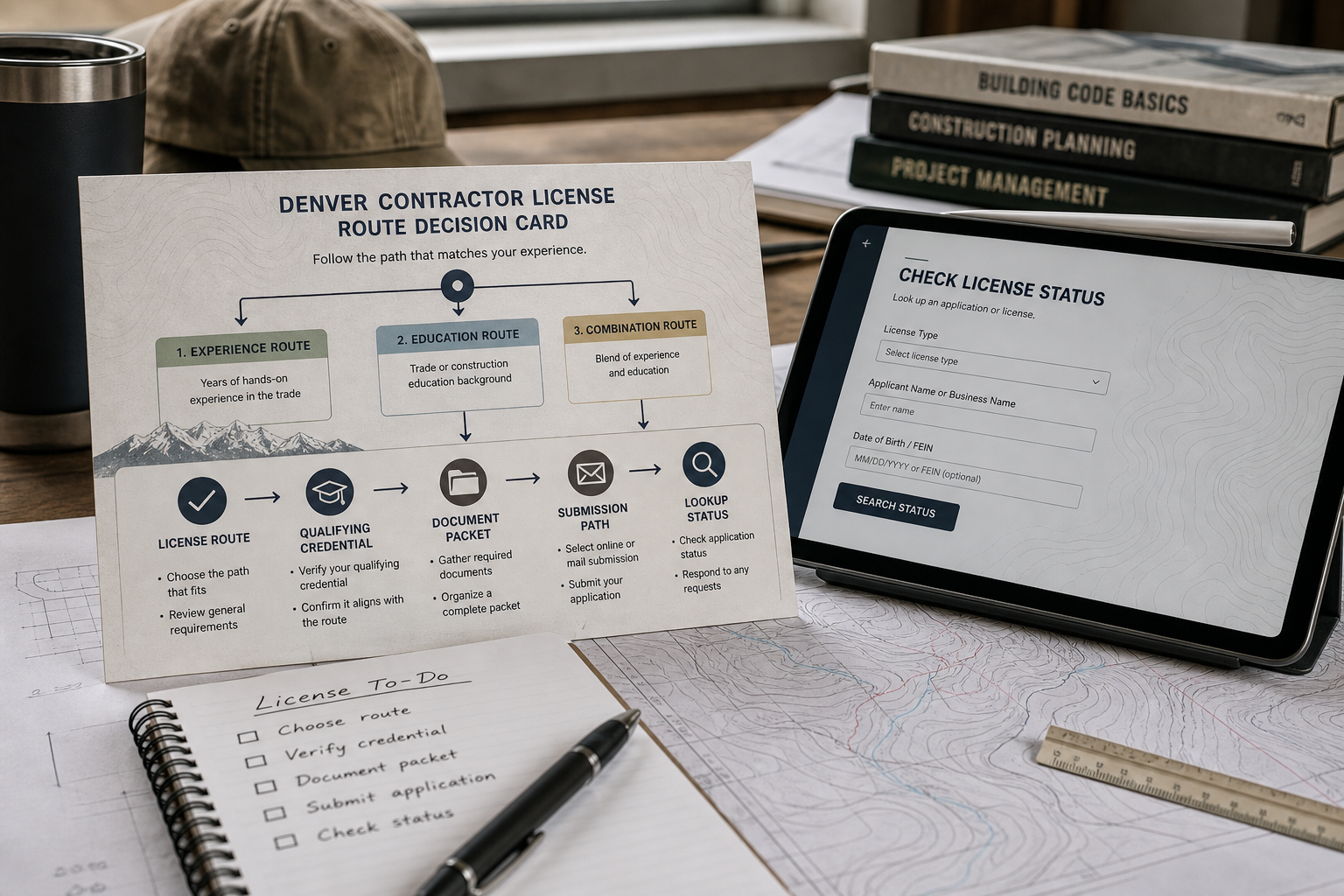
Use this Denver contractor license checklist as a route decision before you file, bid or hire. If you are applying for a new city credential, your first job is to choose the right Denver path. If you are checking a contractor who already claims to be licensed, skip the application packet and verify the record first. If the project touches streets, alleys, sidewalks, quick permits or renewal timing, route yourself to the city page built for that exception.
The goal is not to summarize every Colorado licensing rule. It is to help you make the next Denver-specific decision without mixing Denver with Boulder, statewide trade licensing or exam-prep topics.
Start with the Denver route decision
The first decision is not which form to download. It is which Denver route applies. Denver Community Planning and Development issues contractor licenses and certificates for construction and trade work in Denver, and its licensing page says Denver does not accept or reciprocate contractor licenses or certificates from other counties or states.
If you are starting a standard city contractor credential, move to the qualifying-credential step. If you are checking a contractor, use Denver's license lookup. If the project occupies a public right-of-way or another city-owned area, use Denver's right-of-way license page instead of the standard path. If you are renewing or reinstating an existing credential, start from Denver's renewal or reinstatement instructions rather than treating the filing like a new license.
A practical route test is simple: if the question is "Can this company operate in Denver?" search the license record. If the question is "Can my company apply?" confirm the qualifying credential. If the question is "Does this project fit a special city category?" check the exception page before collecting paperwork.
If it is a new license, confirm the qualifying credential
If this is a new city license application, the next fork is the credential behind the application. Denver describes contractor licensing as a two-step process: before applying for a contractor license, the applicant must hold or employ a Denver supervisor certificate holder, or use a state electrical or plumbing license.
That means a general, building, residential, mechanical or specialty route should not begin as a paperwork exercise. First confirm the supervisor certificate path for the job. Denver supervisor-certificate guidance says applying for a supervisor certificate is the first step toward obtaining a contractor license in Denver, and each certificate type must be applied for separately.
Electrical and plumbing are the key route exception in the city materials. Denver says that if you have an electrical or plumbing license issued by the state, you do not need a supervisor certificate and should apply for a contractor license. Keep that as a Denver application routing rule; do not turn this page into a statewide electrical or plumbing licensing guide.
For right-of-way or sewer activity, Denver's apply page says not to follow the standard contractor steps and instead to use the ROW category information. That is a stop sign, not a footnote.
If the route is clear, assemble the matching packet
If the license route and qualifying credential are clear, the packet should match that path. Denver's application instructions point applicants to Chapter 1 of the Denver Building and Fire Code, the Supervisor Statement of Responsibility when required, Secretary of State documents by legal status, and additional trade documents for electrical, plumbing and Fire Protection A and B applications.
- If this is a standard city contractor credential, confirm the supervisor certificate holder or Colorado electrical/plumbing license path before filing.
- If a supervisor certificate is required, prepare the Supervisor Statement of Responsibility before the license application.
- If the applicant is a corporation, LLC, partnership, foreign entity or sole proprietor using a trade name, match business records to Denver's Secretary of State document list.
- If an owner, officer, partner, member or sole proprietor signs, include the required state-issued photo ID and confirm signer authority.
- If the route is electrical, plumbing or Fire Protection A/B, gather the Denver-listed current state card, certificate or master-license ID attachment.
- If the work is right-of-way or sewer activity, leave the standard application path and use Denver's ROW category instructions.
The city license application itself asks for the license classification, the exact name of the individual or company conducting business, mailing and local address details, contact information, business entity type, applicant personnel and supervisor certificate holder information. It also asks about Denver or other-state license history, license or certificate revocation history, whether Chapter 1 has been read, signature information and a legible copy of the signer's current state-issued driver license or state-issued photo ID.
Treat the signer check as a decision point. If an owner, officer, partner, member or sole proprietor signs and submits documentation, Denver says that person must be listed on current Secretary of State filings, unless the applicant provides allowed notarized meeting minutes or a notarized list of current owners, officers, members or partners with the Secretary of State documents.
If your business record does not match the selected route, pause before filing. A cleaner Denver packet is better than a fast incomplete application.
If the packet is complete, choose the official submission path
If the packet is complete and you are on the standard application path, choose the official Denver submission route. Denver's application page describes online, mail and in-person options, and it states that applications submitted online, by mail or in person take approximately 14-20 business days for review.
Swipe horizontally to view all columns.
| If this is your situation | Use this Denver path | What to verify first | Review or payment note |
|---|---|---|---|
| You are filing a standard new license and can upload documents. | Online through Denver e-permits under Contractor Licensing. | Credential route, required attachments and current fee page. | Use Denver's posted review guidance before planning start dates. |
| You are sending a completed paper application. | Mail using the instructions on Denver's application page. | Signed application, photo ID, business records and any supervisor/trade attachments. | Use the city application page for mail-in review timing after receipt. |
| You need to present the packet in person. | Bring documents to the Contractor Licensing counter listed by Denver. | Same packet as the selected route, plus current payment instructions. | Use the city application page for current in-person review timing. |
| The project occupies streets, alleys, sidewalks or other city public property. | Use Denver's ROW category page instead of the standard checklist. | License type, bond, insurance, trade verification or equipment schedule if Denver lists it for that license. | Follow the ROW page and current fee page rather than assuming the standard application path. |
For online filing, Denver directs applicants to e-permits, where they register for a free account, choose Contractor Licensing, apply for a license or certificate, select the appropriate license type, attach required documents and submit. For mail or in-person filing, use the current instructions on Denver's application page and check the current fee page before payment. Denver maintains a contractor licensing fee page and describes payment methods there, so fee amounts should be refreshed from the city page rather than copied into a permanent checklist.
If the submission route feels unclear, that is usually a sign that the license route is not settled. Go back one decision: standard license, right-of-way path, existing-license verification, renewal or reinstatement.
If you are checking an existing contractor, use Denver's license lookup
If your goal is verification rather than application, skip the packet and use Denver's license lookup. Denver's search page lets users search by company name or by last name if the license is listed under a personal name.
- Search Denver's contractor license lookup by company name, or by last name if the license is listed personally.
- Confirm the license type matches the work being discussed.
- Check the expiration date shown in Denver's record.
- Check the contractor status before relying on the license.
- If the record cannot be matched, stop and verify through Denver's official contractor licensing resources before scheduling work.
A search result is not useful unless it answers three questions: does the license type match the project, is the expiration date current, and does the contractor status show the license is still active? Denver's lookup page specifically tells users to check expiration date and status before relying on a listed license.
This is the cleanest dividing line between application and hiring research. Applicants need the license route and packet. Property owners, project managers and office staff checking an outside contractor need the official lookup result and status fields.
If an exception appears, route to the right Denver source
If the project does not fit the basic path, do not force it through the standard checklist. Denver's ROW category page says a public-property credential is required for activity in the public right-of-way or other public property of the City and County of Denver. That page also lists category-specific additional documents such as bond, insurance, trade verification or equipment schedules for certain public-property paths.
Quick permits are another routing issue. Denver describes quick permits as trade-specific permits that can be issued without plan review only for specific work, and the city warns that most projects cannot be permitted as quick permits, including structural work. A quick-permit question may affect project planning, but it is not the same as proving a contractor license route.
Renewals and fee checks should also stay on their Denver pages. Denver says credential expiration dates appear on each license and are listed on the city's licensed contractor search page. The current fee page should be checked before payment because copied fee amounts age quickly.
Frequently asked questions
Can a contractor use a license from another county or state in Denver?
Denver says it does not accept or reciprocate contractor licenses or certificates from other counties or states, so Denver work should be checked against Denver's own contractor licensing resources.
What if the Denver route is electrical or plumbing?
Denver's contractor licensing pages state that a Colorado electrical or plumbing license can substitute for a Denver supervisor certificate on that path. Keep the article focused on Denver's route and send state-license detail to the official state source when needed.
What if the project uses streets, alleys or other city property?
Use the ROW category instructions. Denver says a public-property credential is required for activity in the public right-of-way or other public property of the city.
Are quick permits the same as a contractor license?
No. Denver describes quick permits as trade-specific permits for specific work that can be issued without plan review, while also warning that most projects cannot be permitted that way, including structural work.
Should this checklist list Denver fee amounts?
Use Denver's current contractor licensing fee page rather than relying on copied amounts. The city maintains a fee page and payment-method guidance, and those details should be checked before filing.
Use this final decision rule: proceed with the Denver application only when the route, credential, packet and submission path all match. Use the lookup path when the task is verification. Use the right-of-way, quick-permit, renewal or fee pages when an exception appears. If the route still cannot be classified, stop and verify with Denver's official contractor licensing resources before relying on assumptions.